
Nutrition Facts panel compliance: the 10 most common formatting errors on CPG labels

Your Nutrition Facts panel passed internal review. The design looks clean. The label went to print. And three months later, you're managing a Class I recall because sesame wasn't declared, even though it was right there in the ingredient list, just without the word "sesame."
That's the reality of Nutrition Facts panel compliance in 2026. The errors that trigger FDA enforcement action and retailer rejections aren't always obvious. They're systematic: a formula change that never triggered a label update, a legacy template still running pre-2025 Daily Values, a font scaled 0.5 points below minimum when the package size changed.
This article breaks down the 10 most common Nutrition Facts panel violations — with 21 CFR citations, current enforcement context, and exactly what it takes to catch each one before it reaches a shelf.
Key takeaways
- Undeclared allergens and inaccurate nutritional data are the two most common triggers for FDA enforcement action on CPG labels.
- The FDA's updated Nutrition Facts panel requirements — including mandatory Added Sugars declaration and revised Daily Values — are now enforceable, and many legacy label templates still don't reflect them.
- Formatting errors (font size, type area, column layout) are the most frequently overlooked category because they don't involve ingredient data, but they still constitute misbranding under 21 CFR 101.
- A structured, automated compliance review process catches errors that four-eyes manual review consistently misses.
Table of contents
- Why Nutrition Facts panel errors keep happening
- Errors 1–4: Data and declaration failures
- Errors 5–7: Formatting and layout violations
- Errors 8–10: Claims, serving sizes, and update failures
- How GoVisually catches Nutrition Facts errors before they cost you millions
Why Nutrition Facts panel errors keep happening?
21 CFR Part 101 is unusually prescriptive. The FDA mandates not just what information must appear, but exact font sizes, type hierarchy, line spacing, and column widths — creating extensive surface area for non-compliance.
- Label data is fragmented across teams. Ingredient data, nutritional values, allergen declarations, and design files typically live in separate systems across formulation, QA, and creative — with no automatic sync between them.
- Formula changes don't trigger label reviews. A supplier ingredient swap can shift a product's nutritional profile without anyone flagging the label for update.
- Legacy templates outlive regulatory changes. The 2025 FDA updates — Added Sugars declaration, revised Daily Values, new mandatory nutrients — required changes across every active SKU. Many brands updated new launches and left the rest untouched.
- Manual review is sequential and undocumented. It catches obvious errors but consistently misses systematic issues that repeat across an entire portfolio.
Errors 1–4: Data and declaration failures
These are the errors with the highest enforcement stakes. They involve what the label says, not just how it looks.
Error 1: Undeclared or incorrectly declared allergens
This is the single most dangerous labeling error in CPG. Under 21 CFR 101.4(b) and the FASTER Act (2023), the nine major allergens — milk, eggs, fish, shellfish, tree nuts, peanuts, wheat, soybeans, and sesame — must be declared either within the ingredient list using their common name or in a separate "Contains" statement immediately following it.
FDA recall data from May 2026 shows undeclared allergens accounted for 5 of the 50 most recent FDA recalls — all Class I, meaning a reasonable probability of serious adverse health consequences. The most common cause isn't ignorance of the rule. It's a last-minute formula change, a supplier substitution, or a copy-paste error in the design file that clears review without being caught.
Sesame deserves particular attention. Since its FASTER Act addition, compliance teams are still finding legacy SKUs where sesame-containing ingredients — tahini, sesame oil, certain spice blends — appear without the required allergen declaration.
Error 2: Inaccurate nutrient values
Under 21 CFR 101.9, declared nutrient values must reflect the actual nutrient content of the food as consumed. The FDA permits a ±20% tolerance for most nutrients — but values outside that range, or directionally misleading ones (understated calories, for example), expose you to enforcement action.
The most common cause isn't bad lab data. It's a formula change — a different fat content in a dairy ingredient, a reformulated flavoring — that shifts the nutritional profile of the finished product without triggering a label update. FDA warning letters consistently cite this pattern: accurate original values rendered non-compliant by an undocumented reformulation.
Error 3: Wrong nutrient order or missing mandatory nutrients
21 CFR 101.9(c) specifies the exact sequence in which nutrients must appear: Calories, Total Fat, Saturated Fat, Trans Fat, Cholesterol, Sodium, Total Carbohydrate, Dietary Fiber, Total Sugars, Added Sugars, Protein, Vitamin D, Calcium, Iron, Potassium. Deviating from this order by even one line constitutes a formatting violation.
Vitamin D and Potassium became mandatory under the 2025 updates, replacing Vitamins A and C (now voluntary). Labels produced before the update that haven't been revised will be missing these required declarations — a straightforward violation that's easy to audit and easy to miss at scale.
Error 4: Incorrect percent Daily Value calculations
%DV figures must be calculated against the reference values in 21 CFR 101.9(c)(9). These were updated in 2025, and brands still using the old Daily Value denominators — even if their gram amounts are correct — will produce wrong %DV figures. A label showing 15% DV for sodium when the correct calculation yields 18% DV is non-compliant, regardless of how minor the difference looks on paper.
Errors 5–7: Formatting and layout violations
Formatting errors are the category compliance teams underestimate most. They don't involve ingredient data, so they feel less serious. But they constitute misbranding under 21 CFR 101 just as surely as a missing allergen declaration.
Error 5: Minimum type size violations
21 CFR 101.9(d) sets specific minimum type sizes for every element of the Nutrition Facts panel. The word "Nutrition Facts" must appear at no smaller than 13 points. Serving size and calorie declarations must be at least 8 points. All other text requires a minimum of 6 points, with a 4.5-point minimum for qualifying small packages.
In practice, violations almost never come from intentional downsizing. They come from the design file being scaled to fit a smaller package without the resulting point sizes being checked. A label compliant at full size becomes non-compliant when a designer scales it down 15% to accommodate a reformatted package.
Error 6: Incorrect use of the simplified format
The simplified Nutrition Facts format — permitted under 21 CFR 101.9(f) — allows certain nutrients to be omitted when present at zero or insignificant levels. The rule is specific: you may only omit a nutrient if it is genuinely at zero (or below the declaration threshold), and you must include a statement that the omitted nutrients are not present.
The common error is using the simplified format as a space-saving measure — to fit a smaller label footprint — without verifying that every omitted nutrient actually qualifies. A product with trace amounts of dietary fiber cannot omit that line under the simplified format.
Error 7: Wrong column format for multi-serving packages
Under 21 CFR 101.9(b)(12), packages containing between two and three servings must use a dual-column format declaring nutrient values both per serving and per container. This requirement trips up brands regularly — particularly for products like single-serve beverages that technically contain 2.5 servings.
In Practice: The dual-column requirement for 2–3 serving packages is one of the most commonly misapplied rules in Nutrition Facts compliance. Retailers and co-manufacturers increasingly flag this during their own label reviews — which means you may find out about it at a vendor audit rather than during your own QA process. Audit your full portfolio against this rule, not just new launches.
Errors 8–10: Claims, serving sizes, and update failures
Error 8: Nutrient content claims that conflict with the Nutrition Facts panel
Terms like "low sodium," "reduced fat," "sugar-free," and "healthy" are legally defined under 21 CFR Part 101. Using them requires meeting specific quantitative thresholds that must be consistent with what the Nutrition Facts panel declares.
The FDA finalized an updated definition of "healthy" as a nutrient content claim in 2025. Products using the "healthy" claim must now meet revised criteria based on food group equivalents and nutrient limits — not just the old fat and sodium thresholds. Brands that qualified under the previous definition may no longer qualify, and a "healthy" claim on a non-qualifying product is misbranding. That conversation needs to happen before the design brief, not after the label is in review.
Error 9: Serving size that doesn't reflect the RACC
Serving sizes must be based on the Reference Amount Customarily Consumed (RACC) for the food category, as defined in 21 CFR 101.12. The RACC is not a suggested portion — it's a regulatory reference amount, and the declared serving size must align with it.
The most common error: a serving size set years ago that was never updated when the RACC tables were revised. Ice cream had its RACC updated in 2016 and again with the 2025 revisions. Brands that haven't revisited their serving sizes since original launch are likely out of compliance on current SKUs.
Error 10: Failure to update legacy templates after regulatory changes
This is the systemic error that underlies many of the individual violations above. The 2025 Nutrition Facts updates required every affected brand to update every affected label. In large CPG portfolios, that means hundreds or thousands of SKUs — and the brands that struggled most weren't those who didn't know about the changes. They were those whose label management processes couldn't systematically identify which SKUs needed updating, or confirm that updates had been completed, reviewed, and approved.
How GoVisually Catches Nutrition Facts Errors Before They Trigger a Recall?
Manual review catches the obvious. It misses the systematic — the wrong %DV calculation consistent across 40 SKUs, the font that's 0.5 points below minimum after a package resize, the dual-column format applied to only half the products that need it. GoVisually's AI compliance tooling is built specifically for what manual review can't do at scale.
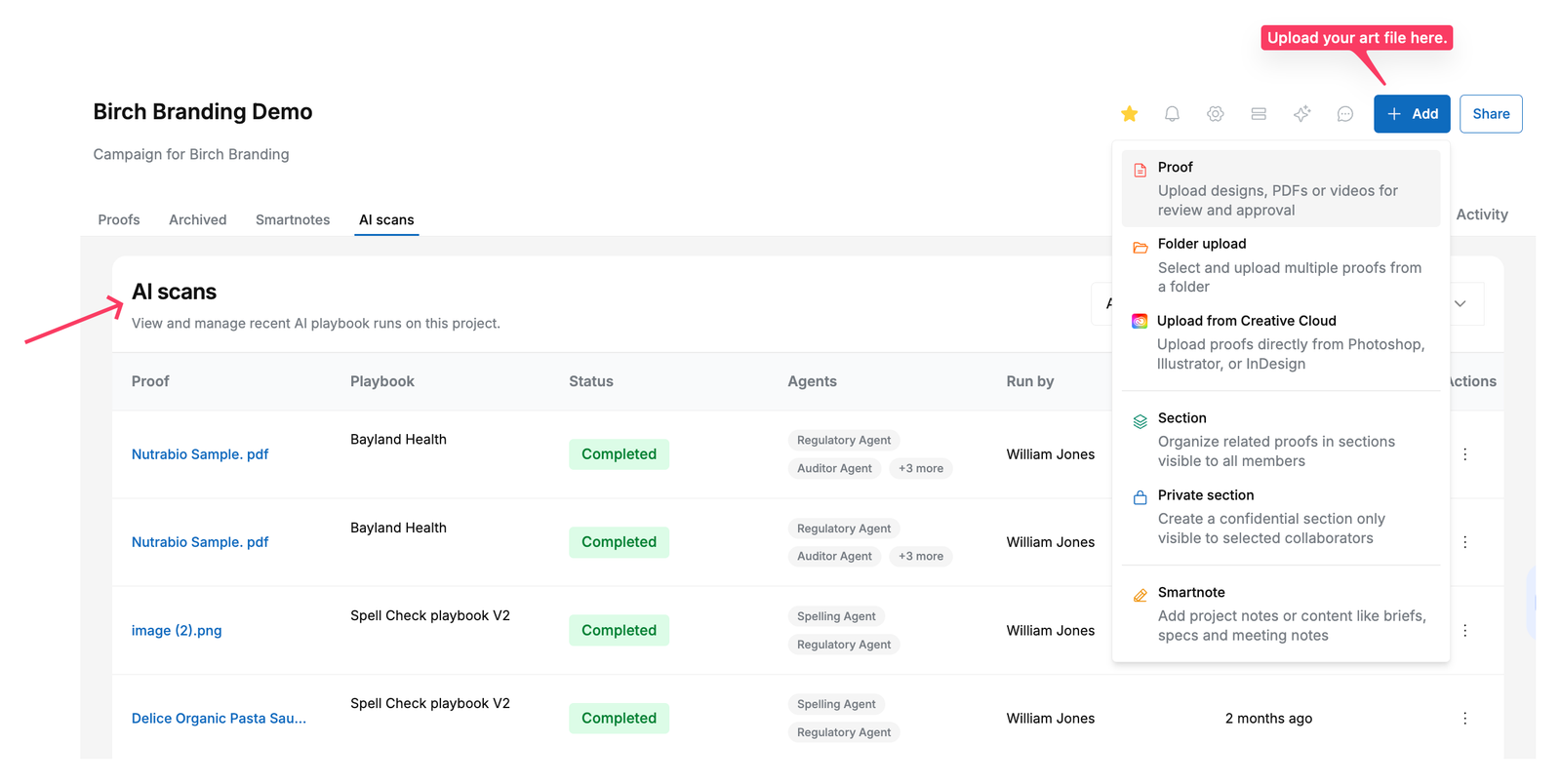
GoVisually's AI Compliance tool runs a structured validation against multiple regulatory bodies such as FDA, FSA, EU, and more. The moment a label file is uploaded — checking mandatory fields, allergen declarations, ingredient order, Nutrition Facts panel formatting, health claims, and net weight. Every finding cites the specific regulatory section, rated Critical, Major, or Minor. Analysis completes in under 30 seconds per label.
How GoVisually catches Nutrition Facts errors?
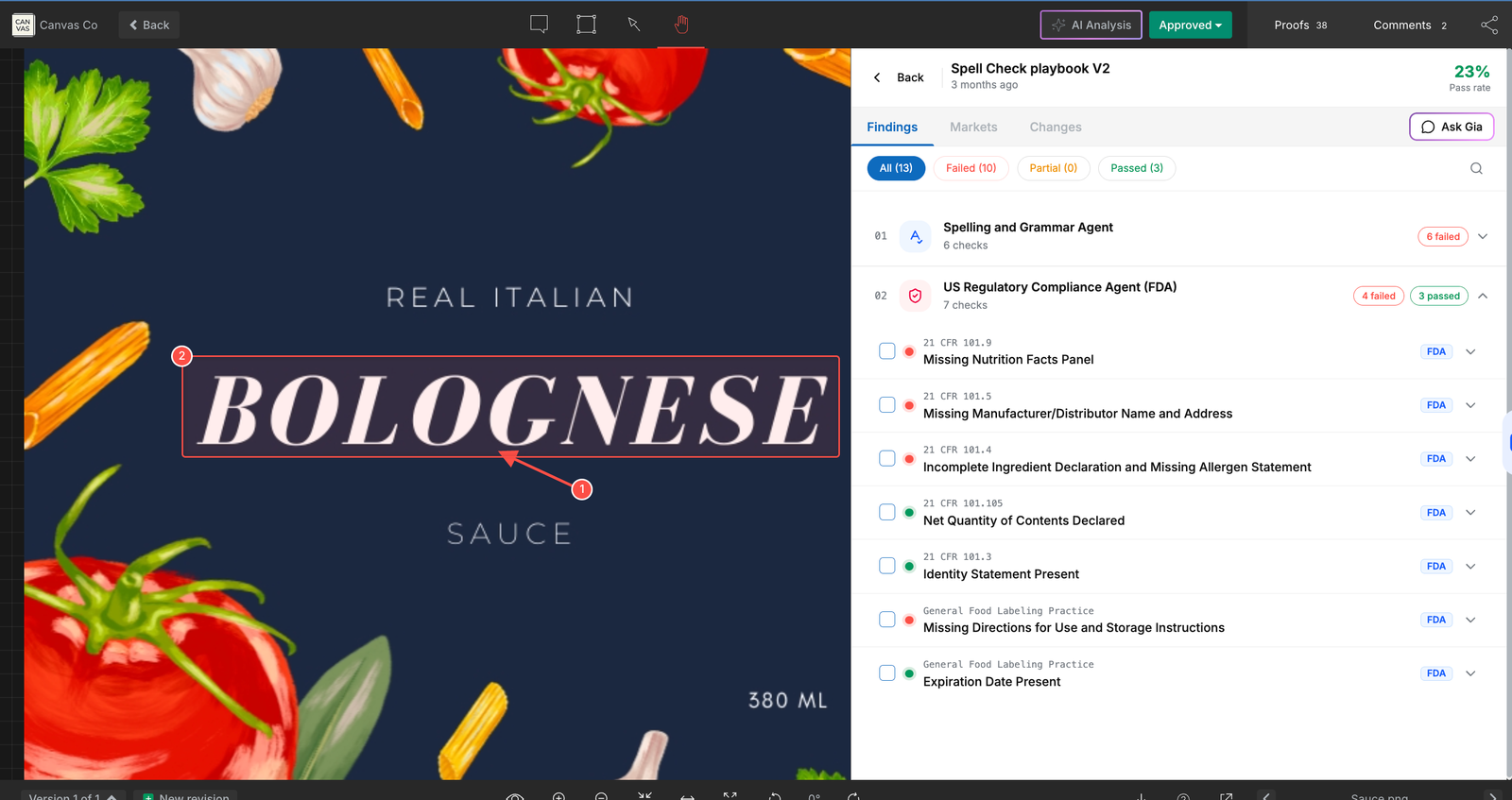
- Automated 21 CFR 101 validation — checks all 10 errors above automatically, citing specific regulation sections
- Visual overlays + bounding boxes — pinpoint exactly where on the label each issue appears (font size violations, missing nutrients, wrong column format)
- AI Playbooks — trigger FDA Regulatory Agent, Spelling and Grammar Agent (v1.0), and Visual Elements Validator (v1.0) in sequence when label uploads, no manual initiation required
- Allergen sign-off checklists — mandatory human gate before approval; every completion logged with timestamp + reviewer name for full audit trail
- Version comparison tools — pixel-level difference detection across 5 comparison modes with automated Difference Highlighting to prove Nutrition Facts panel wasn't altered between print runs
- Portfolio-wide filtering — tag labels with Target Market, Regulatory Status, and filter to show only "Nutrition Facts pending allergen sign-off" or "labels with open Critical findings"
For teams managing 50+ SKUs across multiple markets, GoVisually's Custom Fields let you organize and filter your entire portfolio by EPR-relevant metadata: state markets, material types, recyclability status, formula version, and regulatory review stage.
The audit trail GoVisually generates is directly relevant to FDA and other regulatory compliance documentation. Every proof upload, compliance check result, comment, approval, and checklist completion is logged with timestamp and user attribution — exportable as CSV or branded PDF compliance report, ready for retailer or regulator audits.

Schedule a free demo to see GoVisually's AI Playbooks handle your specific compliance workflow.